Showing posts with label Fedora Activity. Show all posts

June 3, 2010

FAD Pune 2010

It all started with a discussion on having a FUDCON India this year. Someone suggested some agendas, others observed the agenda as more suited to a series of FADs, and we decided to have a FAD, off course in Pune as that would make the job of finding a venue, internet connectivity and people a piece of cake. More on that later.


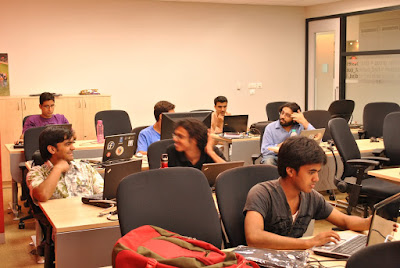
FAD, which is the abbreviated form of "Fedora Activity Day", is an event where people meet up together and work towards getting things done. Everyone has some plans of how they want to spend their time during a FAD and so did all of us. Someone wanted to do some packaging, others aimed at some serious bug zapping and some just wanted to sit and hack on some tough piece of code. Mine was the simplest plan of getting stuffs packaged. I wanted to get some packages reviewed and review some in return. The next few lines shines some light on what I did in the two days.
I had a very start on the first day when I accidentally broke my specs. Wasn't really able to read stuffs and could not get much done. Still I tried to review rtnpro's python-keyring package as I had taken that up earlier. It was missing some dependency and wasn't really compiling. Tried to fix that for him, could not get it done. Even Kushal da tried his hand on it but in vain. Next was getting python-plwm reviewed which I had submitted earlier. Rahul happily took up the task and recommended a few changes which I did and submitted. In the afternoon had a great discussion on Open Hardware with Siddharth from BHASHA . He is a great guy with a barrage of ideas. tuxdna DNA got interested in the ARMStrongIDE project and took it up actively. In the evening, Rahul showed me how to start a different window manager by using .xinitrc . It was really fun. Thus the first day bode farewell.

After a good night sleep, all of us were back on Sunday, all charged up to get things done. Second day was a little more eventful for me. Got my specs repaired. Susmit da had already prepared a wishlist for Fedora Medical Spin. Started packaging one of those, GNUMed to be precise. Also helped Ankur in his glorious attempt tp package kufper which uses the waf build system that too an age old version. Sayamindu da's talk was the highlight of the day, "OLPC as a downstream of Fedora and problems faced". In the mean time rtnpro worked on his vocab building application and Ankur on Fedora tour. Harsh did some packaging for Medical spin as well. Runa spent the day working on Gnote help. By this time, it was evening and Rahul wanted to discuss what we achieved, what more could have been done, what went wrong. Everyone had different opinions but on one stream all agreed - "We need to have more specific agendas". An online version of this event ought to follow soon. The day was concluded with some FUDCON related discussions and so was the FAD.


This was the first FAD I ever attended and it was a great learning experience for me. It was lot more fun and productive and collaborative than any irc version can ever be. Hope to see atleast annual FADs in the years to come if not more.

May 15, 2009

Fedora Activity Day at Dr. B.C Roy Engineering College

On 14th May, Thursday, a Fedora Activity Day was organized by the Durgapur Linux Users' Group (DGPLUG) at Dr. B.C Roy Engineering College, Durgapur. Though this event was in planning for a long time and was supposed to happen 1 months earlier, it had to be postponed by more than a month. But it finally materialised. Well as they say- "Better late than never".
Ratnadeep contacted me long back and I agreed to take a session on FEL and helping them out with the FAD in general. On the day of the FAD, I was all ready to tune in to FEL mode.
The organizers had arranged for a nice computer lab for the FAD. It had around 30 computers and each was running a FEL live DVD, the ones they had burned the previous night. These would be serving a triple purpose- FEL demonstration, KDE desktop demo and free media. All set up, we were waiting for the students who started arriving at around 11:30 a.m and the lab was almost full by 12:00 noon. We were there, ready to get, set and go.
The FAD started with an "Introduction to Fedora project" by makghosh followed a very nice presentation on " Myths about Linux busted with Fedora" by Kishan Goyal. Subhodip chipped in at times where some extra information needed to be provided. These two sessions established the foundation and explained to the people what Fedora is. Next in line was a very colourfull demonstration by our artwork team members, the Linux chix of DGPLUG. They showed some cool Inkscape handiwork and some artwork they had made themselves. What's the use of a Linux installation if you cannot use it. Yes usability is very important and the next demo served exactly this purpose. It was a demo on Desktop usability. Sunny Sharma, with a little help from Ratnadeep and me, did a pretty great job of amazing the audience with the frills and cool graphics of KDE. It was already 2:10 and our stomachs were growling. So we decided to take a lunch break and meet at 2:45 sharp.
The people were really punctual and almost all of them were back at 2:50 p.m after a trip to the canteen upstairs. I forgot to mention that there was a blizzard outside and we had a power cut. The lab was running of UPS which was crying out loud and could give up any moment. All the PCs were switched off and only the bare necessities were kept running- the projector and the laptop. Under such grave circumstances I got up to start a demo of IRC. Sunny Sharma was helping me out. The Airtel mobile office connection that we were using was damn slow and we were left with no other choice than www.mibbit.com/chat as Airtel blocks IRC port. We explained them the concept of IRC, what are networks, what are channels and what are nicknames. Connecting to a network and joining a channel was also showed. Channels like #fedora, #fedora-india, #dgplug, #nitdgplug, ##linux on freenode were sown. Then came the very important thing about IRC ettiquette. Roshan Singh and Shakthi Kannan helped us demonstrate IRC live. Roshan helped establish a very good point that its not always geeky stuffs on IRC but we also have fun.
By this time a few electronics students had joined the crowd and they had come exclusively for the Fedora Electronics Lab session. So we began the FEL session without further delays. The UPS had already run out of life and I had to use the laptop to show them the various things we can do with FEL. No big screen this time. Almost the whole portfolio was demonstrated. I kept in mond the student's necessities and demonstrated only those tools in details which would be useful to them. gsim85, Ktechlab, octave, piklab, gresistor, drawtiming, ghdl were some of the tools. I had prepared some examples and used them to illustrate the functionalities. One student was also asked to try his hand on KTechlab and he did a pretty good job. KTechlab pretty much was the spotlight tool. The students were also give some tips on how to contribute to FEL , the fedora-electronic mailing list and some sites wich might come in handy. The power cut still loomed large and a concensus was reached to continue with the other sessions the next day.
I wasn't present the next day but as I heard that around 30 people attended the sessions, and learned a lot from the gcc, vim, shell commands sessions. As a toping to the ice cream, Subhodip gave a presentation on how to contribut to FOSS. That was pretty much it. All that remained was a follow up to this event which is already under planning and will probably be held in August. Till then the participants ave got enough to chew on.


April 10, 2009

Interactive Fedora Know How Session

Yesterday, 9th April, an interactive session was held at NIT Durgapur. This was planned as a follow up to the previously held install fest and was mainly aimed at making people familiar with the various contributing avenues besides being a problem solving session for the attendees. This was also going to be a first speaking opportunity for two of our junior LUG members. One was Vikas Singh who was supposed to speak about common configurations and package managing using rpm, yum and another was Roshan Singh gave demonstration of IRC and mailing lists.

Publicity was done well. Posters and notices were put up everywhere. Announcements were also made on various mailing lists. This session was going to be similar to the session done by Kushal Das last year when he came to our college along with three other ambassadors from Durgapur.

The session was to start from 6:00 pm and people started arriving. We finally started the session at 6:30 pm. Around 25 people were present there out of which almost 20 were new faces. It was exciting to find so many new people interested in FOSS. The session began with package management. Yum and rpm were demonstrated. Dependencies were explained. Then it came to basic configurations like proxy settings, samba, SELinux etc., which needed to be done to make ones Fedora system universally usable. The various important packages and codec packs were named. Packagekit was also demonstrated. Vikas also did a good job in showing the local language desktop and keyboard layouts.


Roshan was next and and he demonstrated IRC and mailing lists, starting with IRC. Thanks to www.mibbit.com for being there to help us out as IRC client do not work in our college due to firewall. He showed how to join the various channels like #nitdgplug, #dgplug, #fedora-india, #fedora etc on freenode.net. He even pinged Sankarshan da telling him that he was on a big screen in front of future FOSS contributors. Sankarshan da waved at the people. He also demonstrated other stuffs like nick registration, nickserv commands, whois command and etiquette of talking on IRC and mailing lists. Next came the mailing list and people were shown how to join a mailing list. They were also told about the various mailing lists like fedora-list, fedora-india, nitdgplug etc. The redhat mailman index page address was also given to them.


I was next and started with installation from source. The steps were explained to them in details and debugging flag was also illustrated. After that came the very important thing of bugzilla. They were explained what a bug is and how do detect it. GNOME Bugzilla was shown to them, how to search bugs, how to file bug reports were parts of it. Bug triaging was also demonstrated with a gedit bug. The various links were given to then. Redhat Bugzilla was also shown. Then came the time for Fedora project contribution guide and they were told about the various sub projects, what are their roles and how to join them. Artwork, Peoples' person, localization were a few that were mentioned. live.gnome.org and code.google.com were also shown to them since upstream contribution was the theme of this session. I also told them about Linux Chix project and the girls seemed pretty excited about it. I also mentioned the wonderful site by Shakti Kannan. That was almost all of it.

I called upon Debayan to conclude the session by sharing his experience as a FOSS contributor and he did a good job in motivating the people present. He told them about planets and showed them planet-floss India. He ended the session with the I am Linux contest videos and the new motto that came up in our mailing list "Just do it because you can".


The session seemed to be pretty productive one and only time will tell us if we actually moved the people's hearts. The various links given to them were as follows:

http://docs.fedoraproject.org/drafts/rpm-guide-en/
http://live.gnome.org/GnomeLove/HowToStart%20En
http://live.gnome.org/GnomeLove
http://live.gnome.org/Bugsquad/TriageGuide
http://bugzilla.gnome.org/
https://bugzilla.redhat.com/
http://fedoraproject.org/wiki/Join
http://fedoraproject.org/wiki/PackageMaintainers
http://fedoraproject.org/wiki/PackageMaintainers/Join
http://www.linuxchix.org/
http://www.gizmostyle.com/2009/04/08/linux-enters-the-im-a-macim-a-pc-row-with-were-linux/
http://www.shakthimaan.com/downloads/
https://www.redhat.com/mailman/listinfo

Fedora stickers were in abundance which were distributed to the attendees and extra were given to them for distributing them to their friends. Since then I have noticed some new people on the mailing list and the session seems to be successful but this is too early to say something like this. Hope it helps the FOSS world and in turn the world.


March 16, 2009

Live USB Magic

Now a days almost all the computers have the ability to boot from USB. This ability can be put to use by installing an operating system on a usb stick. This makes it possible to carry your OS with you where ever you go. Live usb is an example of OS on usb stick. All you need to make a live usb is a live image of the OS and a usb disc with sufficient memory. This post explains in a step by step manner the process of creating a live usb.

1)Download the live image from the site

Here's the link for Fedora: Fedora10-KDE-Live

2)Check the size of your usb stick

You can do it by issuing this command:

df -h


3)Creating partition and filesystem on the usb stick


Issue the following command to get into fdisk and follow the steps:

fdisk /dev/USBDEVICE (/dev/sdc in my case)

Command (m for help): d (This deletes the partitions)
Selected partition 1

Command (m for help): n (This creates a new partition)
Command action
e extended
p primary partition (1-4)
p
Partition number (1-4): 1 (This gives the number of partitions)
First cylinder (1-960, default 1):
Using default value 1
Last cylinder or +size or +sizeM or +sizeK (1-960, default 960):
Using default value 960

Command (m for help): t (This sets the file system type)
Selected partition 1
Hex code (type L to list codes): 83 (For Linux flesystem types-
ext3/ext2 etc)
Changed system type of partition 1 to 83 (Linux)

Command (m for help): a (This toggles the bootable flag)
Partition number (1-4): 1 (This is the partition number which is
to made bootable- /dev/sdc1
in my case. So '1')
Command (m for help): w (Writes the changes to the partition table)
The partition table has been altered!

Calling ioctl() to re-read partition table.

Syncing disks.


4)Formatting the file system

First unmount the usb stick

umount /dev/USBPARTITIONNAME

Then issue the following command to format in EXT3 filesystem.

Caution: THis will erase all files on the disc

mkfs.ext3 -L usbdisk /dev/USBPARTITIONNAME (/dev/sdc1 in my case)


5)Copying the live Fedora image

su -c "livecd-iso-to-disk /path/to/ISO /dev/USBPARTITION" (/dev/sdc1 in
my case)
Password:
Copying live image to USB stick
Updating boot config file
Installing boot loader
USB stick set up as live image!


6)Booting from the live usb

Restart the computer and go to BIOS. Enable USB boot and change the priority of usb device to highest. This has to be done with the usb stick inserted. Then save the changes and exit BIOS. The computer will auto restart and voila. The live usb is in action. Behold the live OS (Fedora Live) coming up on your screen.


For troubleshooting refer to this Tutorial

February 23, 2009

Not Just Another Install Fest

If you haven't guessed already what this blog post is going to be about, let me tell you that this post brings to you my experience at the Kalyani Government Engineering College Install Fest and FAD. It all started when I got a call from Rohit Gupta, whom I had met before at Mukti 09, telling me that they want to organize an Install Fest and FAD provided I can arrange for free DVDs and some expert help. I posted it on Fedora-India and Fedora-Ambassadors mailing list and soon I started getting replies from people who were willing to provide the resource that was required. Susmit Sannigrahi and Debayan Bannerjee were two of them. I was guided to the 'events' page at Fedora wiki where I filled in the required details and within no time the FAD and Install Fest was off to a very good start. In the next three days Rohit and me along with the much needed help of the KGEC final year and KGEC authority, not to mention the Fedora-India team, made all the arrangements for the one day event that was going to be a first of its kind in KGEC.
The preparations started the day before the fest was scheduled to happen. Stuffs like getting printouts, burning around 50 DVDs for distribution, fixing the agenda, final publicity were among the few things that we were busy with on the eve of the Install Fest. That day earier I had met Susmit da at Santoshpur and picked up the 50 Fedora 10 DVDs and othe stuffs like stickers and badges. These were to be distributed the next day. Debayan and Shreyank, who were coming on the day, were bringing in 50 Fedora 10 DVDs and 20 FEL DVDs with the. I called up Ratnadeep and Shreyank and querried about their journey plans. Then off for a good night's sleep.
The next morning the KGEC boys were busy making all the final arrangements. I woke up at somebody telling me frantically that they are unable to manage the crowd that had gathered at the areana for registration. The day had started with a good note. I did my cores and rushed to the arena to be surprised by what I saw. The queue was a neat 50 metres long and continued till the institution gate. People were waiting outside in a queue not being able to get in just because there was no room inside the seminar hall, not even to stand. Shreyank and Mitesh Sharma, who came in place of Debayan because Debayan couldn't com due to his friend being very ill, had arrived at Kalyani Main. I gave them directions on how to get to KGEC. Subhodip, Arindam and Ratnadeep were a bit late due to their bus getting caught up in some kind of road block. It was 11:30 and Indranil Das Gupta, the founder of ILUG-Cal had also arrived, inspite of being sick, and have had an informal meeting with the Pricipal and other faculty members regarding the prospects of FOSS and Linux in the college. We started the proceedings at around 11:35 with the indroductory speech of the anhor Snigdhadeb followed by speeches by the Faculty members and HODs who were present there. The hall was jam packed with around 140 - 145 people attending the event. 150 Fedora 10 DVDs and 20 FEL DVDs were distributed amongst the attendees and some faculty members as well. The principal of the CSE department talked about his experiences with Linux, about how everybody used to laugh at people who used Linux. His encouraging speech was followed by our very own Indranil da talking about the evolution of Linux and FOSS in India, how he managed to install Linux in those pre graphics days. His information impregnated speech touched the topics like LUG culture, GSoC, OSM, FOSS in India, mailing lists and many more things. He also tried to explain how one can contribute to FOSS exemplified aptly by Sayamindu Dasgupta, Arindam Ghosh, Gopal V. and Subhodip Biswas. He ended his speech quoting President Obama, "We will be the Agents of Change" and "Yes We can". Though he was ver interested to stay for the whole day, but he had to leave to attend a meeting in Kolkata. His speech really inspired the participants and got the rhythm going.

Just Look At The Length Of The Queue

The Install Fest Banner

That Is What I Mean By 'Jam Packed'

Anchor Snigdhadeb and Other Dignataries

Indranil Das Gupta's Inspirational Speech

During Indranil da's speech, there was a power failure and this 2 hour long blackout slowed things down to a halt. Unable to continue, lunch had to be announced. The next session was to begin as soon as the power comes back which did only after 2 very long hours at 14:00 hrs. The second session stared at 14:10 hrs with Arindam (aka makghosh) spreading the word about Fedora with his "Introduction to Fedora talk". We couldn't get Ratnadeep's nvidia card to work with dual sisplay and so Arindam had to use my laptop for the presentation. He played the very popular 'Truth Happens' video which thrilled the audience. He then talked about four 'F' s of Fedora, the development cycle, the Fedora community and a lot of other things related to Fedora. His talk was followed by Subhodip busting the myths about Linux with his really nice "Myths about Linux: Busted With Fedora" talk wherein he tried to remove the various misconceptions about Linux. He illustrated the licensing problems with proprietory formats like .mp3 and .wmv and also showed them how to get stuffs installed from rpmfusion and get their linux box to do whatever they wanted it to do. The audience was captured by his frivolous yet illustrative way of talking. Arindam and Subhodip then showed some demos and questions started flying in. In the mean time Ratnadeep and me were trying to set up the local repo in the lab. Though the interactive session was getting more and more interesting with mak and Subhodip addressing queries, we had to cut it short since we were running out of time for the actual install fest. It was already 16:15 hrs. and the participants were eager to move to the lab for the install fest. At 16:20 hrs. Subhodip and Arindam wrapped up and the people were asked to move to the lab.

Arindam Giving An Introduction To Fedora

Subhodip's Myth Buster Talk

Wow What A Crowd

Query Session With Mak Subhodip and Me

The install fest began with around 55-60 people attending it. Around 15 people had brought their laptops. The others were given around 15 lab computers which they shared to learn the install process. We atually had about 35 people who brought in their systems, but some them left as we were delayed by the power failure and they had to go home for the weekend. The installation kicked off at 16:30 hrs. and every step was explained by me on the projector. The custom partitioning and the default partitioning, both were explained properly. People had queries about partitioning problems but once it was explained, they all were quite content. then came the customization of packages and which is what stage. While the OS was being installed, I told them a bit about rpmfusion, IRC, mailing lists, rpm installation, bugzilla, bug triaging, artworks, how to join fedora etc. etc. Once Fedora installation was complete, Ratnadeep and me got busy with the configuring the systems and showed them how to do it. Ratnadeep's offline repo came handy. Many people jotted down the various steps involved. A brief demo of GNOME and KDE desktop was give. They were pretty fascinated by the superb look and feel of KDE 4.2. Some even christened it as being better than Vista. Some applications like network-manager, pidgin, samba windows networking, nautilus etc. were also shown. It was already 18:00 hrs. and we had to finish up quickly. Then came the enthusiasts and they asked about how to do this, that and various stuffs. One thing I forgot to mention is that among the large number of participants and enthusiasts, there were also a lot of girls. Well then we went back to the hostel but before the we left Fedora's mark in th lab by sticking Fedora stickers on the systems. About 50 of them were also distributed amongst the participants.
Me Demonstrating Install Process


Installing Fedora on Laptops

The install fest had'nt yet ended. In the hostel namely RBC Hall, Ratnadeep and me installed Fedora on a lot of systems having different configs. Faced some problems with nvidia cards with graphical install not working. Ratnadeep configured the systems using his newly made local repo and shell script. I had to configure triple boot with Ubuntu and Windows on some of them by manually editing the grub.conf file. I also showed them how to do it. Ratnadeep's offline repo was of great help. Finally it all ended at around 2:30 a.m. wen we decided to go to bed since we had catch the early morning train the next day.
The Team

It was a great experience to be in Kalyani for tha FAD and without the
support the KGEC boys and the college authority, it wouldn't have been possible. It felt really nice to share knowledge with so many people. I myself learnt a lot . Kudos to Rohit, Snigdhadeb, Sunil, Ekhlaque, Debraj, Tanmoy and others who made this possible. Hope to see more coming from you guys.